What changed for Shopify quantity breaks in 2026
Three things shifted for Shopify quantity breaks merchants this quarter. First, Shopify rolled out native B2B volume pricing on every plan tier in April 2026, so smaller stores can now run wholesale tiers without Shopify Plus — useful for B2B but still does not render a per-unit pricing table on the storefront product page, which is the conversion-driving piece quantity-break apps own.
Second, pricing: Oxify runs a single plan at $14.99/month or $129.99/year after a 14-day free trial, with no revenue or order cap, while revenue-capped rivals step up to $29.99–$59.99 tiers as your offers earn more. If you need $0, see the free options compared.
Third, the Shopify App Store's Built for Shopify badge tightened its performance criteria for 2026 — apps that fail Core Web Vitals on a real merchant theme lose the badge. Oxify still holds it; some legacy quantity-break apps do not.
Last updated September 19, 2026, against the live Shopify App Store listing.
How to Create Quantity Breaks on Shopify — Tiered Volume Discounts on Any Product Page
Here is how to create quantity breaks on Shopify: shoppers pay less per unit when they buy more, and the tiers show right on the product page. Add them to any product in under 5 minutes with Oxify, the all-in-one Quantity Breaks Builder. No code. No theme edits.
Built for Shopify · 4.9 ★ (13 reviews) · $14.99/mo after 14-day trial · no revenue cap
- Tiered volume discounts
- Buy more, save more
- Mix & Match bundles
- BOGO offers
- Free gifts
- Bundle analytics
Reported range once tiered pricing is visible on the product page.
1-click install, guided templates, and no theme edits required.
Quick answer: How do you create quantity breaks on Shopify?
Shopify has no native quantity breaks feature. Its built-in discounts apply at checkout and cannot show a per-unit price table on the product page, so adding quantity breaks to Shopify means installing an app. Whether you call them quantity price breaks, price breaks for quantity, tiered pricing, or volume discounts, the mechanic is the same: the per-unit price drops as the quantity in the cart goes up.
With the Oxify app the process takes about five minutes: install from the App Store, add the quantity breaks block through the Shopify theme editor, set your tiers (for example Buy 2 save 10%, Buy 3 save 20%), and publish. No code and no theme file edits.
- Cost: $14.99/month or $129.99/year after a 14-day free trial — one plan, no revenue cap. Native Shopify discounts are $0 but checkout-only.
- Compatibility: Online Store 2.0 themes, Shopify Checkout, Shopify Markets.
- Discounts: applied automatically at checkout, no coupon codes needed.
- Typical result: AOV lifts of roughly 18–35%.
What are quantity breaks on Shopify?
A Shopify quantity break is a tiered discount that rewards shoppers for buying more units of the same product. Instead of one flat price, the product page shows several price tiers, and the per-unit price drops as the quantity goes up.
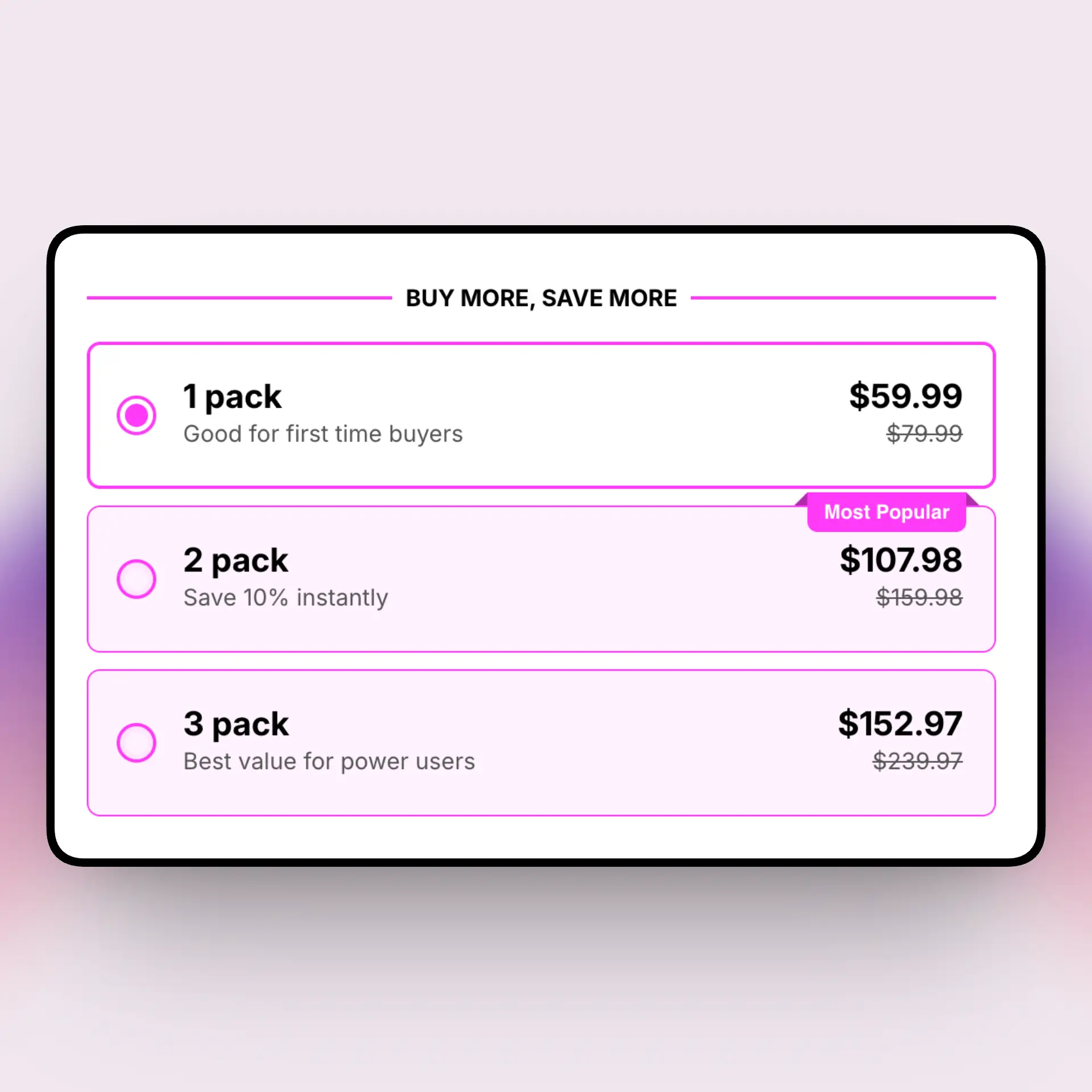
A typical quantity break looks like this:
- 1 unit — $20 each (regular price)
- 2 units — $18 each (10% off)
- 3 units — $16 each (20% off)
- 5+ units — $14 each (30% off, best value)
Quantity breaks are also called quantity price breaks, volume discounts, tiered pricing, bulk discounts, or simply quantity discounts — price breaks for quantity, whatever name you search under. Shopify merchants use them to lift average order value, move more units per order, and reward bulk buyers — without coupon codes at checkout. For the full explainer, read what are quantity breaks.
Can Shopify do quantity breaks without an app?
Not on the product page. Shopify's built-in discounts work at checkout — coupon codes and automatic discounts. They cannot show a buy-more-save-more pricing table on the product page, build a visual bundle layout, or A/B test offers. That display is exactly where quantity breaks earn their AOV lift, because shoppers see the savings before they decide.
You can still approximate a quantity break for free: create an automatic discount under Discounts → Create discount → Amount off products with a minimum quantity. It only shows at cart and checkout, needs one rule per tier, and counts toward Shopify's limit of 25 active automatic discounts. See every free option compared.
A dedicated quantity breaks app fills the product-page gap. The Oxify Quantity Breaks app renders the tier table, calculates per-unit prices and total savings, and adds a "best value" badge — all without touching your theme code.
How to create quantity breaks on Shopify in 3 steps
- Install the app. Add Oxify Quantity Breaks & BYOB from the Shopify App Store. It connects in one click and adds the quantity breaks block to your product template.
- Set your tiers. Choose a layout, then set tiers like Buy 2 save 10%, Buy 3 save 20%, Buy 5 save 30%. Pick percentage, fixed amount, or fixed price, and tag your "best value" tier.
- Publish and track. Save and the widget goes live instantly. Watch conversion rate, units per order, and AOV in the built-in analytics.
Want the long version with screenshots and five different methods? See how to set up quantity breaks on Shopify.
Shopify quantity break examples that lift AOV
The best quantity break tiers match how people actually buy your product. Here are starting points by store type:
| Store type | Example tiers | Why it works |
|---|---|---|
| Supplements & vitamins | 1 bottle · 2 save 10% · 3 save 20% | Matches a 1–3 month supply, so buying in bulk feels natural. |
| Coffee & consumables | 1 bag · 2 save 10% · 4 save 25% | Regular re-buyers stock up when the per-bag price drops. |
| Skincare & beauty | 1 unit · 2 save 15% · 3 save 25% | Encourages "one for me, one for backup" and gifting. |
| Apparel & socks | 1 pair · 3 save 15% · 5 save 25% | Multi-packs lift units per order on low-ticket items. |
| Pet treats | 1 pack · 2 save 10% · 6 save 30% | Heavy users buy in bulk to save on repeat shipping. |
Start with 3 tiers, give the middle or top tier a best value badge, and keep every tier above your margin floor. Need help picking discounts? Read the quantity break pricing guide.
Best quantity breaks Shopify app
Oxify Quantity Breaks & BYOB is $14.99/month (or $129.99/year) with a 14-day free trial — one plan with every feature included and no revenue or order cap. Rated 4.9★ on the Shopify App Store.
Oxify Quantity Breaks & BYOB is a Built for Shopify app that bundles quantity breaks, BOGO, mix & match, Build Your Own Box, free gifts, and A/B testing into one install. The point of difference is the flat price: it does not scale with your revenue, and there is no higher tier to unlock BOGO or A/B testing. If a $0 budget is a hard rule, a capped free tier or Shopify's native discounts will get you started — we compare them honestly on the free quantity breaks page.
Comparing options? See the full Shopify quantity breaks app comparison on our homepage, or the deep-dive guide to the best quantity break apps for Shopify. Running wholesale & quantity breaks together? See volume discounts on Shopify for the B2B side.
5 quantity break mistakes to avoid
- Too many tiers. More than 4 tiers confuses shoppers. Three is the sweet spot.
- Discounting below margin. Set a floor so even your deepest tier still earns a profit.
- Hiding the offer. Put the tier table right under the Add to Cart button, not at the bottom of the page.
- No best-value badge. Shoppers need a nudge toward the tier you want them to pick.
- Never testing. Small changes to discounts and wording move revenue. A/B test before you commit.
For the full playbook, read how to increase sales with quantity breaks.
Shopify quantity breaks — quick answers
How do I add quantity breaks to Shopify?
Install a quantity breaks app like Oxify, pick a template, set your tiers, assign the offer to products or collections, and publish. Most stores go live in under five minutes with no code.
Does Shopify support quantity breaks natively?
Not on the product page. Shopify's native discounts work at checkout only. A quantity breaks app adds the tiered pricing table and buy-more-save-more logic to the product page.
Are Shopify quantity breaks free?
Shopify's native automatic discounts are free but checkout-only. For a product-page tier table you need an app: some have capped free tiers, and Oxify is $14.99/month (or $129.99/year) after a 14-day free trial, with no revenue cap.
Do quantity breaks increase average order value?
Yes. Tiered pricing on the product page typically lifts AOV 18–35%. One Oxify merchant reported a 25% AOV increase after about two months.
Will quantity breaks slow down my store?
Oxify carries Shopify's Built for Shopify badge, reserved for apps that meet Shopify's highest standards for performance, design, and integration.
Can I run quantity breaks on a collection?
Yes. Assign an offer to specific products or whole collections, so a single rule can cover many SKUs at once.
What discount should quantity breaks offer?
Most stores start around 10% on the first tier and step up to 25–30% on the top tier. Keep every tier above your margin floor so even the deepest discount still turns a profit.
Quantity breaks vs volume discounts — what's the difference?
They're often the same idea: buy more, pay less per unit. "Volume discount" is used more for B2B and wholesale, while "quantity break" usually means the product-page tier table. Oxify does both.
Add quantity breaks to your Shopify store in five minutes.
Tiered volume discounts, BOGO, mix-and-match bundles, free gifts, and analytics in one plan. Try it free for 14 days.
$14.99/month after the trial, or $129.99/year. 1-click install. Cancel anytime.